Alisha: The Google Slide Template That Feels Like a Magazine
Staring at a blank presentation canvas can feel paralyzing. Whether you’re pitching a new service to a client, onboarding a new hire, or outlining a social media strategy, the medium matters just as much as the message. We’ve all sat through those presentations where every slide looks exactly the same—text on the left, image on the right, white background. It’s functional, sure, but it rarely inspires. If you are looking to break that monotony and present your ideas with the visual flair of a high-end lookbook, you need a tool that respects design principles as much as you do.
Enter Alisha, a presentation template that shatters the standard mold of corporate slideshows. Unlike standard templates where you simply duplicate a slide layout twenty times, Alisha treats every single page as a unique canvas. It’s designed for the modern creative—the marketer, the entrepreneur, the designer—who understands that visual storytelling is the fastest way to capture attention. If you have ever flipped through a glossy fashion magazine or a modern lifestyle editorial and wished your presentations could feel that cohesive yet dynamic, this is the solution you’ve been waiting for.
Designed for the Modern Eye: The Lookbook Aesthetic
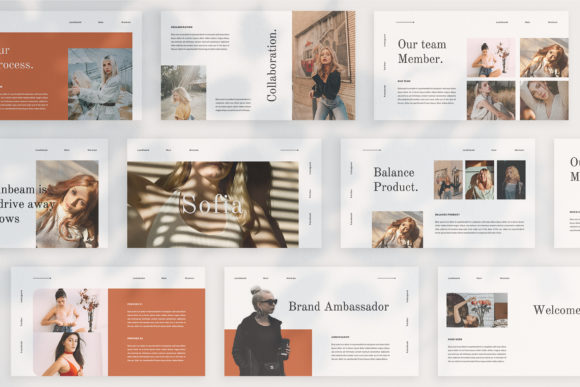
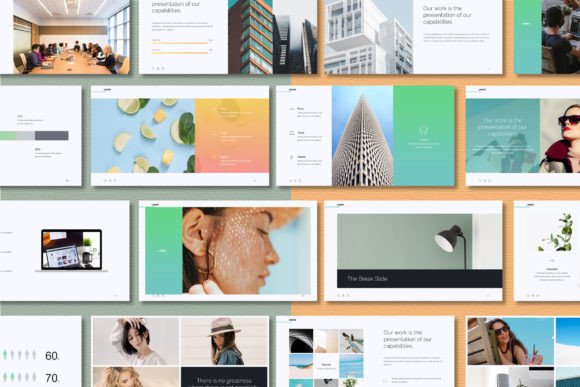
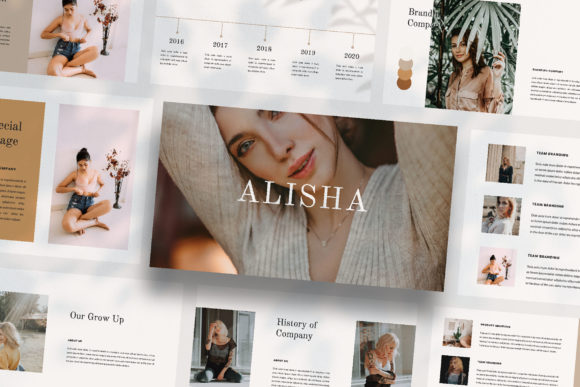
What makes a presentation truly memorable? It’s usually the layout. Standard slide decks often force your content into rigid grids, but real-world design—think packaging, posters, and social media feeds—relies on asymmetry, white space, and variety. Alisha is built on this "lookbook and magazine style" concept. It acknowledges that a quote might need a full-bleed background image to land with impact, while a data point might need a minimal, clean sidebar.
This approach is incredibly powerful for anyone working in digital media, branding, or marketing. When you use a template with this level of visual variety, you aren’t just sharing information; you are curating an experience. The template leverages a Full HD resolution (1920x1080 pixels), ensuring that your images look crisp and your typography remains legible, whether you are projecting on a conference room screen or sharing your screen on a Zoom call.
The visual language of Alisha is sophisticated yet accessible. It doesn't rely on distracting animations or clunky transitions. Instead, it uses strong photography and smart typography to do the heavy lifting. This makes it a perfect match for creative agencies presenting mood boards, photographers showcasing a portfolio, or boutique brands outlining their upcoming product line. It bridges the gap between a static PDF and a dynamic video, giving you the best of both worlds.
Practical Applications: Beyond the Boardroom
While the primary function is clearly for pitching and presenting, the versatility of a high-quality template like Alisha extends far beyond the boardroom. Because the design is so editorial, you can easily repurpose these layouts for a variety of visual communication needs. If you are a content creator or a small business owner, thinking creatively about your assets is key to efficiency.
Consider the demands of modern social media graphics. Creating cohesive Instagram Stories or Pinterest pins requires a steady stream of visually engaging layouts. With Alisha’s unique slide variations, you have a library of pre-designed frames. You can export individual slides as high-res images to use as standalone graphics. This ensures your digital products and social feeds maintain a consistent brand identity without looking repetitive.
Furthermore, the template serves as an excellent starting point for editorial layouts. If you are working on a digital magazine, a lookbook for an investor, or a visual guide for a workshop, the structure is already there. You can use the slides to plan out packaging design presentations or web design mockups. The "magazine style" layout naturally lends itself to storytelling, allowing you to guide your audience through a narrative arc—starting with the "why," moving to the "how," and ending with the "wow." It’s also perfect for invitations to digital events or creating sleek merchandise catalogs.
Streamlining Your Workflow with Smart Features
For many professionals, the barrier to good design isn't a lack of taste, but a lack of time. Wrestling with alignment, font pairing, and image cropping is tedious. This is where the technical execution of the Alisha template shines. It is built with Slidemaster technology, which is a game-changer for efficiency. This feature allows you to simply drag and drop your images into pre-made placeholders. The heavy lifting of resizing and cropping is handled for you, ensuring your images always fit the frame perfectly.
One of the standout features is the Unique Theme Colour system with automatic color change. Branding is all about consistency. If your company colors are specific shades of teal and slate, you shouldn't have to manually select every text box and shape to change them. With this feature, you can update the global theme, and the entire presentation shifts to match your brand palette instantly. This is vital for maintaining visual consistency and brand recognition across all your marketing assets.
Additionally, the template utilizes free fonts. How many times have you opened a purchased template only to find it requires a $50 font license to look right? Alisha includes links to free fonts in the Help & Instruction PDF, keeping your project budget-friendly. The "Many Variations of Layout and Text" means you aren't just buying one look; you are buying a toolkit of modern typography arrangements that can adapt to different amounts of content, from image-heavy slides to text-dense data slides.
Matching Typography to Your Project Goals
Typography is the voice of your design. When selecting a template, or even considering how to customize one like Alisha, it helps to understand the personality of the typefaces involved. Is the font a bold display font that screams for attention, or a delicate serif font that whispers elegance?
Alisha typically pairs clean, modern sans-serifs with stylish accents. This balance is crucial for readability. A common mistake in presentation design is prioritizing style over substance—using a beautiful script font for body text, for example, which becomes impossible to read from the back of the room. A good template guides you toward font pairing that works: a strong header font for impact and a legible body font for information.
When customizing your slides, consider your audience. If you are presenting a business proposal to a corporate partner, you might stick to the cleaner, bolder layouts. If you are creating a mood board for a fashion brand, you might lean into the layouts that feature more whitespace and artistic text placement. The goal is to ensure your professional presentation feels intentional. The typography should support your message, not distract from it.
Elevating Your Brand Identity
Ultimately, a template is just a vessel. The value lies in how you use it to tell your story. Using a premium tool like Alisha signals to your clients and partners that you care about quality. It shows that you value their time and attention enough to present your ideas beautifully. Whether you are a freelancer pitching a logo design concept, a startup outlining a growth strategy, or a teacher creating engaging course material, the visual standard you set matters.
By utilizing the Picture Placeholder features and the high-resolution layout, you can transform standard business data into a compelling visual narrative. Don't just tell your clients what you do; show them. Use the lookbook style to create an immersive environment that makes them feel the brand, rather than just reading about it. In a world saturated with mediocre PowerPoint decks, choosing to present with style and intention is one of the easiest ways to stand out.