Pumeda: A Versatile PowerPoint Template for Modern Presentations
Creating a presentation that truly captures attention and communicates your message effectively requires more than just good content. The visual framework you choose sets the tone, establishes credibility, and guides your audience through your story. This is where a thoughtfully designed template like Pumeda becomes an invaluable asset, transforming standard slides into a cohesive and professional visual experience.
A Foundation Built on Clean, Adaptable Design
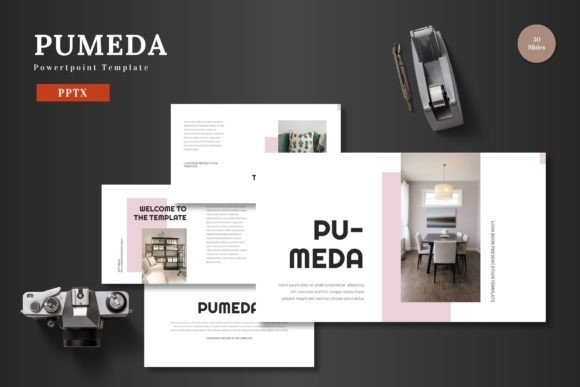
Pumeda is built on the principle of clean, scalable design. Its aesthetic is modern and colorful, yet it maintains a professional restraint that prevents visual clutter. This balance is crucial. A presentation that is too busy distracts from your message, while one that is too plain fails to engage. The template strikes that perfect middle ground, offering a polished backdrop that lets your content—whether it's a business strategy, a product launch, or a portfolio showcase—take center stage.
The true power of this template lies in its multipurpose nature. It's not locked into a single industry or use case. An entrepreneur can use it to craft a compelling pitch deck that wins over investors. A marketing team can build a dynamic product promotion that drives sales. A freelancer can assemble a sleek portfolio that lands new clients. This flexibility makes it a reliable design asset for a wide range of professional and personal projects, ensuring your presentations always look intentional and on-brand.
Practical Applications Across Your Brand Touchpoints
While primarily a presentation tool, the design principles and assets within Pumeda can inspire and support your broader visual identity. The clean layouts and consistent color schemes provide a blueprint for visual consistency. Imagine using the same color palette and graphic style from your presentation in your social media graphics or on your website. This creates a seamless brand experience for your audience, reinforcing recognition and trust.
Consider how you might leverage its structure:
- Business & Marketing: Develop quarterly business reviews, marketing plans, or sales training decks that look consistently professional.
- E-commerce & Product Promotion: Showcase new product lines, explain features, or present sales data with clear, engaging infographics and slides.
- Pitch Decks & Investor Presentations: Tell your startup's story with a polished, confident visual narrative that includes market analysis, team bios, and financial projections.
- Portfolio & Case Studies: Creatives and agencies can display their work, client testimonials, and project outcomes in a gallery-style format that feels curated and high-end.
- Internal Communications & Training: Create onboarding materials, company announcements, or workshop slides that are easy to follow and visually engaging for your team.
Streamlining Your Workflow with Editable Elements
One of the most significant time-saving features is that every element is fully editable directly within PowerPoint. There's no need to switch to other complex design software to make changes. This accessibility is a game-changer for busy professionals who need to update content quickly. You can simply input your text, drag and drop your images into the built-in placeholders, and adjust colors to match your brand guidelines with just a few clicks.
The inclusion of animated slides is another thoughtful touch. Subtle animations can help direct audience focus, reveal information sequentially, and add a layer of professional polish. Used sparingly, they enhance storytelling without becoming a distraction. The template provides these ready-to-use animations, so you don't have to spend time building them from scratch.
Furthermore, the package is built for scalability and customization. With over 150 total slides across five premade color schemes, you have a vast library of layouts at your disposal. Whether you need section break slides to organize your narrative, handcrafted infographics to visualize data, or gallery slides for a visual portfolio, the structure is already in place. All graphics are vector-based, meaning they are resizable and editable without losing quality, giving you complete creative control.
Ensuring a Professional and Cohesive Result
Achieving a high-quality presentation often comes down to details that are easy to overlook. Pumeda addresses several of these key considerations. The use of master slides ensures uniformity in fonts, colors, and logos across your entire deck. Changing a design element on the master slide automatically updates it throughout the presentation, which is essential for maintaining visual consistency, especially in longer documents.
The pixel-perfect illustrations and graphics contribute to a sharp, professional look on any screen, from a laptop to a large projector. The drag-and-drop picture placeholder feature simplifies the process of incorporating your own images, ensuring they are perfectly framed and sized within the design. This eliminates the guesswork and manual adjustments that can eat up valuable time.
When you download the template, you receive five PPTX files for widescreen presentations, each corresponding to a different color scheme, along with a helpful readme file. This file typically contains information about the fonts used and sources for photography, which is critical for maintaining licensing compliance and achieving the intended look. Checking these details before you start your project ensures you can replicate the template's style accurately and legally.
Ultimately, a great template like Pumeda serves as a powerful starting point. It provides the professional structure and visual polish, freeing you to focus on what truly matters: your content and your message. By leveraging its clean design, extensive customization options, and practical features, you can create presentations that not only inform but also impress and engage your audience, time and time again.